 NURL registrynurl-lang.org →
owner @Hindurable
[dependencies]
lingbot-map = "^0.12.3"
0.12.3 · 2026-10-22 · @Hindurable · files · api0.12.1 · 2026-10-16 · @Hindurable · files · api0.10.2 · 2026-10-10 · @Hindurable · files · api0.10.1 · 2026-10-08 · @Hindurable · files · api0.10.0 · 2026-10-03 · @Hindurable · files · api0.9.9 · 2026-09-28 · @Hindurable · files · api0.9.8 · 2026-09-16 · @Hindurable · files · api0.9.7 · 2026-09-16 · @Hindurable · files · api0.9.6 · 2026-08-31 · @Hindurable · files · api0.9.5 · 2026-08-31 · @Hindurable · files · api0.9.4 · 2026-08-28 · @Hindurable · files · api0.9.3 · 2026-08-16 · @Hindurable · files · api0.9.2 · 2026-08-16 · @Hindurable · files · api0.9.1 · 2026-07-29 · @Hindurable · files · api0.9.0 · 2026-07-29 · @Hindurable · files · api0.8.0 · 2026-07-28 · @Hindurable · files · api0.7.0 · 2026-07-28 · @Hindurable · files · api0.6.0 · 2026-07-28 · @Hindurable · files · api0.5.0 · 2026-07-28 · @Hindurable · files · api0.4.1 · 2026-07-27 · @Hindurable · files · api0.4.0 · 2026-07-27 · @Hindurable · files · api0.3.0 · 2026-07-27 · @Hindurable · files · api0.2.1 · 2026-07-26 · @Hindurable · files · api0.2.0 · 2026-07-26 · @Hindurable · files · api0.1.0 · 2026-07-25 · @Hindurable · files · apiStreaming 3-D reconstruction, in pure NURL. Hand it a folder of video frames; it hands back a world-space point cloud, plus a camera pose and a depth map for every frame — one frame at a time, no per-scene optimisation, no structure-from-motion pass.
It is a port of LingBot-Map, the feed-forward 3-D foundation model, and it runs the same 1.16 B parameter checkpoint the reference does. Every stage is checked against the reference PyTorch implementation, and on the same GPU it is several times faster end to end. The whole deliverable is compared against the reference over whole sequences — same frames, same checkpoint, cloud against cloud — under How close is it really.
nurlpkg install lingbot-maplingbot-map my-frames/That is the whole command: a folder of .png or .jpg frames in, a point cloud out. The first run downloads the 4.6 GB checkpoint from Hugging Face and caches it under ~/.nurl/models; every run after that starts straight away.
frames 286 -> cloud.ply
model  /home/wau/.nurl/models/lingbot-map/lingbot-map.pt
frame 1/286  33025 points  526 ms  .../courthouse/000000.png
frame 2/286  66564 points  157 ms  .../courthouse/000001.png
frame 3/286  98930 points  158 ms  .../courthouse/000002.png
...
frame 286/286  8602925 points  410 ms  .../courthouse/000285.png
wrote 8602925 points to cloud.ply  (286 frames, 108624 ms)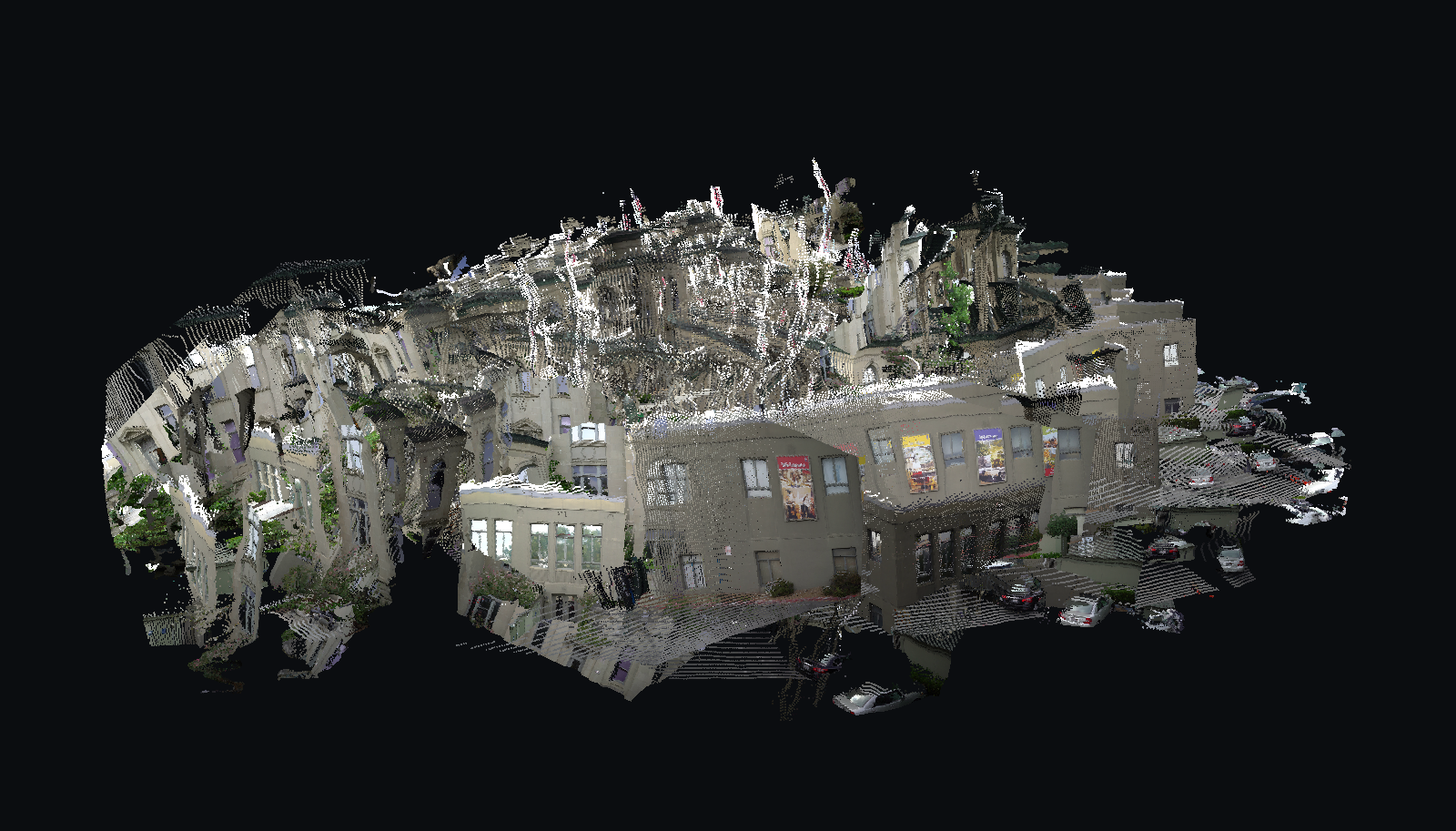
All 286 frames of the courthouse walk as one reconstruction — facades, shopfront posters, the parked cars, the street. Rendered by the viewer below fromlingbot-map --conf 3 ...; the exact view is?yaw=1.15&pitch=0.18&dist=0.60&trim=0.94&roll=0.30, so you can reproduce it.
Point it at a cloud:
$ lingbot-map view cloud.ply
viewer  http://127.0.0.1:8080
cloud   cloud.ply  123 MB
Ctrl-C to stop
Open http://127.0.0.1:8080 in your browser. That is the whole thing — the command prints the address and then serves until you stop it with Ctrl-C. Nothing else is installed and nothing is fetched from the internet; the page is inside the binary.
If port 8080 is taken, pick another and open the address it prints:
$ lingbot-map view cloud.ply --port 9000
viewer  http://127.0.0.1:9000
To go from frames to a viewer in one command, the way demo.py does, add --view — it reconstructs first and then serves, printing the same address when it is ready:
$ lingbot-map --view ~/dev/lingbot-map/example/courthouse
frames 286 -> cloud.ply
model  /home/wau/.nurl/models/lingbot-map/lingbot-map.pt
frame 1/286  33025 points  526 ms  .../courthouse/000000.png
...
wrote 8602925 points to cloud.ply  (286 frames, 108624 ms)

viewer  http://127.0.0.1:8080
cloud   cloud.ply  123 MB
Ctrl-C to stop
Once it is open: drag to orbit, wheel to zoom, shift-drag to pan, r to reset the view, c to cycle the colouring, [ and ] for point size.
A particular view can be linked to with URL parameters: ?yaw=&pitch=&dist=&roll=&ps=&trim= — angles in radians, dist as a multiple of the automatic framing. roll exists because the world frame is the first camera's, and a hand-held first frame is rarely level.
The three sliders, in the order they matter:
That is almost always sky the depth head placed a long way off, and it is the difference between a legible first frame and a white wall. Push it further for a cleaner scene; pull it back to 0% to see everything the model produced.
shuffled once when they load, so 10% is a tenth of the whole scene rather than the first tenth of the walk.
cloud.ply is an ordinary PLY, so MeshLab, CloudCompare, Blender and f3d cloud.ply open it too.
A video, or a folder of .png/.jpg/.jpeg files whose names sort into the order they were shot. A video is just handed over:
lingbot-map --view walk.mp4          # extract at 10 fps, reconstruct, view
lingbot-map --fps 5 walk.avi         # sample it sparser
Frames land in walk_frames/ next to the file — the same place demo.py puts them — and --max-frames, --stride and the rest apply to them unchanged. An MJPEG .avi is parsed by lingbot-map itself, in pure NURL; every other codec (H.264 .mp4, HEVC, VP9, ...) uses ffmpeg when it is on PATH, and the error tells you so when it is not.
Shooting for reconstruction: move steadily, keep sharp fixed features in view (corners, signs, textured walls — the model tracks what it can see), and avoid spinning in place. 10 fps of a walking pace is plenty; more frames add ghost layers faster than they add coverage.
The example sequences the reference uses — courthouse, loop, university — come with its repository, under example/. Everything below uses one of those, so the numbers are reproducible.
# a quick look first: 30 frames instead of all 286
lingbot-map --max-frames 30 ~/dev/lingbot-map/example/courthouse

# the whole walk, but every 20th frame — 15 frames, 4 s
lingbot-map --stride 20 --out sparse.ply ~/dev/lingbot-map/example/courthouse

# every pixel rather than every second one — 4x the points
lingbot-map --pixel-stride 1 --out dense.ply ~/dev/lingbot-map/example/courthouse

# keep more of the uncertain geometry (1.0 is "the model knows nothing")
lingbot-map --conf 1.2 --out loose.ply ~/dev/lingbot-map/example/courthouse

# a checkpoint you already downloaded, and where the time goes
lingbot-map --model ./lingbot-map.pt --profile ~/dev/lingbot-map/example/courthouse

# a few individual frames, in the order you name them
lingbot-map shot0.png shot1.png shot2.png

# a text PLY, for reading with your eyes
lingbot-map --ascii --max-frames 2 --out two.ply ~/dev/lingbot-map/example/courthouse--model <path|ref> | checkpoint to run: a local .pt, or a Hugging Face ref such as robbyant/lingbot-map/lingbot-map.pt. Default: $LINGBOT_MAP_MODEL, else ~/.nurl/models/lingbot-map/lingbot-map.pt, else that ref is fetched |
--out <file.ply> | where to write the cloud (default cloud.ply) |
--conf <f> | keep pixels whose confidence exceeds this (default 1.5, the reference's own --conf_threshold) |
--pixel-stride <n> | take every nth pixel on both axes (default 2) |
--max-frames <n> | stop after n frames |
--stride <n> | use every nth frame, applied after --max-frames |
--fps <n> | frames per second to take from a video (default 10) |
--image-size <n> | input width in pixels, a multiple of 14 (default 518); smaller = fewer tokens = less memory |
--frames <dir> | a directory of frames; the same as naming it positionally |
--ascii | write an ASCII PLY instead of binary_little_endian |
--quiet, -q | no per-frame progress |
--profile | per-stage frame timings and a per-kernel GPU profile |
--view | open the viewer on the cloud once it is written |
--port <n> | viewer port (default 8080) |
--version, --help |
The reference's own spellings work too — --model_path, --image_folder, --conf_threshold, --first_k, --video_path, --fps, --image_size — so a demo.py command line mostly transfers.
Order is the trajectory. Frames are read in name order, and the model keeps a cache across frames, so each one is placed relative to the ones before it. A shuffled directory reconstructs a different scene.
demo.pyThe model is the same and the numbers agree; the packaging does not.
demo.py endsin a viser viewer with camera frusta, per-frame playback and a sky mask; lingbot-map view orbits the cloud and lets you trim and thin it. Both run in a browser on localhost.
demo.py shellsout to OpenCV for every codec; this parses MJPEG AVI itself and uses ffmpeg for the rest.
demo.py runs the first --num_scale_frames(8 by default) frames as one block with bidirectional attention among themselves, and only then goes frame-by-frame. The port is causal from frame 0, which is what demo.py --num_scale_frames 1 does. Measured on 12 frames, that alone is worth 3.3% of the cloud (370 052 points against 357 693). Everything in How close is it really compares against the reference driven the port's way, so it is a separate gap and is not folded into those numbers.
--mode windowed, --keyframe_interval,--mask_sky and --rotate_clockwise_90 have no equivalent here. The sliding KV window is what bounds the memory instead of keyframes, which is why 286 frames run at a flat 410 ms each; past ~320 frames demo.py would start dropping to keyframes and this will not.
demo.py casts the aggregator to bf16. In eagermode that is slower on this card — 155 ms a frame against f32's 141 — and it is not what the accuracy figures above were measured against.
sequence and with the frame's token count, and stops growing once the sliding KV window fills: landscape frames (518x294, 783 tokens) run ~6.8 GB at 8 frames, ~10 GB at 30, ~16.4 GB at 286 and beyond. Portrait frames cost ~1.75x — they crop to 518x518, 1375 tokens — and a long portrait video does not fit a 24 GB card at the default size. A run that cannot fit says so up front, with the numbers and the levers; --image-size 392 is the usual fix, and --stride / --max-frames cap it further.
yourself: hub pull robbyant/lingbot-map/lingbot-map.pt, or download lingbot-map.pt from huggingface.co/robbyant/lingbot-map and pass --model <path>. The -long and -stage1 checkpoints in the same repository are read the same way — layer counts come off the file rather than from a constant.
No Python and no PyTorch. The kernels are CUDA C compiled at run time through NVRTC, so the driver (libcuda) and libnvrtc are what you need at run time, and nothing at all at build time.
An RTX 4090, f32 on both sides, same frames, same checkpoint. tests/ref_cloud.py drives ~/dev/lingbot-map through its own inference_streaming and writes the same cloud, so this is the whole command against the whole command, not a module against a module:
| frames | reference | this port | |
|---|---|---|---|
| 1 | 14.6 s | 1.6 s | 9.2x |
| 4 | 14.5 s | 2.0 s | 7.1x |
| 12 | 15.8 s | 3.4 s | 4.6x |
| 20 | 17.2 s | 5.1 s | 3.4x |
Most of that is the checkpoint: the port reads 4.6 GB straight into device memory in 1.6 s where torch.load plus load_state_dict takes ~12.6 s, and that cost is paid once however long the sequence. On inference alone the two are close — at 20 frames the reference spends 3.7 s and the port about 3.5 s.
Per module, on one frame with the load excluded (tests/ref_timing.py, the same slice --profile reports):
| reference | this port | |
|---|---|---|
| aggregator | 77 ms | 100 ms |
| camera head | 54 ms | 16 ms |
| depth head | 10 ms | 22 ms |
| one frame | 141 ms | 138 ms |
Ahead on the camera head, behind on the other two, and the sum lands where the reference's does. End to end, including the 1.6 s checkpoint load, eight frames take 2.8 s, thirty take 7.5 s and all 286 take 109 s.
A frame costs more the more of the sequence it has to attend to, and then stops: 157 ms at frame 2, 400 ms by frame 73, and 410 ms at frame 286. That plateau is the sliding KV window filling up — past 72 frames the model attends over a bounded cache, so the per-frame cost is flat however long the walk is.
The reference here is torch in eager mode, which is what ref_timing.py measures on both sides. demo.py can also turn on torch.compile and CUDA graphs; that is a faster reference this has not been measured against.
--profile shows where a frame goes, and which kernels it spends it in:
prep 33 ms  aggregator 100 ms  camera 16 ms  depth 22 ms  cloud 1 ms
  44%  gk32_gemm_smem     1152 calls    201 us each
  11%  gk32_attn64_32      288 calls    206 us
   9%  gk32_gemv           304 calls    156 us
7% gk32_lnormrow 760 calls 53 usEvery stage is checked against the reference itself. Where an oracle can import the upstream module and drive it, it does, rather than working from a second reading of the source — a hand-written oracle is just another chance to make the same mistake, and once did.
These are what the suite prints, worst relative error in each case:
| stage | vs the reference |
|---|---|
| frame preprocessing | identical, every value |
the .pt checkpoint, 1342 tensors | identical to torch.load |
| 2-D and 3-D rotary embeddings | 0 |
| patch embedding, one transformer block | 4.4e-15 |
| camera geometry | 2.4e-16 |
| DINOv2 trunk, on a real frame | 6.5e-6 |
| the whole aggregator, four tapped layers | 5.3e-6 |
| two frames through the KV cache | 5.3e-6 |
| KV eviction, 120 frames | 0 |
| eviction against the real model, past the window | 9.3e-6 |
| camera pose, after four refinement passes | 2.3e-7 |
| depth, confidence and world points, end to end | 1.5e-5 |
f32 on both sides. The 1e-6-and-up figures are float32's own noise accumulating over 72 transformer blocks; the ones near 1e-15 are stages short enough that nothing accumulates.
Every one of those is a one- or two-frame measurement. They say the arithmetic is right. They do not say what a 300-frame reconstruction looks like, and the next section does.
tests/ref_cloud.py runs ~/dev/lingbot-map over the same frames and writes the same cloud; tests/cmp_cloud.py asks whether every point of one has a point of the other in the same place, relative to the size of the scene. Both are in the suite as step 20.
| frames | point counts | median displacement | centroid drift |
|---|---|---|---|
| 1 | 33 024 vs 33 025 | 2.3e-5 | 6.9e-5 |
| 4 | 129 979 vs 129 982 | 2.5e-4 | 2.3e-4 |
| 12 | identical | 2.4e-4 | 1.3e-4 |
| 20 | 589 997 vs 590 002 | 2.4e-4 | 1.2e-4 |
The error is flat — frame 20 sits as close as frame 4 — and the per-frame scale agrees with the reference to ±3e-4 down the whole sequence. What remains is float32 noise accumulating through two KV caches, not drift: nothing compounds.
It was not always flat, and the bug is worth recording. Through 0.4.x the per-frame clouds were right and their placement wandered — by 20 frames the centroid sat 1.8e-1 of the scene away and the reconstruction read as rubble. The camera head was running cacheless, so every frame was posed alone; the reference's CameraCausalHead attends causally over every previous frame's camera token, one KV cache per refinement pass, and its eviction guard (tokens-per-frame > 1) never fires for a one-token stream, so those caches deliberately hold the entire trajectory. No per-module test could see it: the aggregator's activations were flat-correct all along, and pose agreement had only ever been checked on frame 0, where a cacheless head is indistinguishable from a causal one.
Each frame is resized and cropped to 518 px wide, run through a frozen DINOv2 ViT-L/14 trunk, then through 24 pairs of transformer blocks that alternate between attention within the frame and causal attention across frames over a KV cache. Four of those pairs are tapped and fed to two heads: a camera head, which refines a 9-vector pose over four passes, and a DPT decoder, which gives a depth map and a per-pixel confidence. Depth plus the pose plus the intrinsics unprojects to world-space points, and that is the cloud.
The cache is what makes it streaming: frame N is placed relative to every frame before it, so the poses all land in one world frame without any global optimisation. Past 72 frames a sliding window evicts the middle of the sequence and keeps the first 8 frames and the last 64, which is what bounds the memory.
cd packages/lingbot-map && ./tests/lingbot_map_test.shTwenty-one steps, each building its own NURL binary. Steps that need the checkpoint, a python with torch, or the upstream package skip cleanly when those are absent — that is the fast path, and it is what CI runs. For the full set, set PYTORCH_PY (or drop a venv at the repo root as .venv-oracle) and check out the upstream package at ~/dev/lingbot-map.
Step 21 renders the viewer in a headless Chrome and needs google-chrome or chromium on PATH; it skips cleanly without one and needs no checkpoint. Step 20, the end-to-end differential, additionally needs a CUDA torch — .venv-oracle is deliberately a CPU build, since correctness is all the other steps need. Set LINGBOT_CUDA_PY, or drop one at the repo root as .venv-cuda, and LINGBOT_CUDA_DEV if the first CUDA device is not the one you want.
docs/porting-notes.md — how the port was built, every trap that was silent when it was wrong, and what the speed work actually turned out to be. docs/checkpoint.md — all 1342 tensors read out of the real file.
Built on torchpt (reads the .pt without executing its pickle), gpukit (the kernels) and image (PNG/JPEG decode and a PIL-compatible bicubic resize).