 NURL registrynurl-lang.org →
owner @Hindurable
repository https://github.com/nurl-lang/nurl-lang
[dependencies]
pki-server = "^0.5.2"
0.5.2 · 2026-10-16 · @Hindurable · files · api0.4.2 · 2026-10-10 · @Hindurable · files · api0.4.1 · 2026-10-08 · @Hindurable · files · api0.4.0 · 2026-10-03 · @Hindurable · files · api0.3.2 · 2026-09-16 · @Hindurable · files · api0.3.1 · 2026-08-28 · @Hindurable · files · api0.3.0 · 2026-08-20 · @Hindurable · files · api0.2.0 · 2026-08-19 · @Hindurable · files · api0.1.0 · 2026-08-18 · @Hindurable · files · api^0.7A high-performance, self-contained Private PKI (Public Key Infrastructure) Certificate Authority and HTTP microservice written entirely in pure NURL.
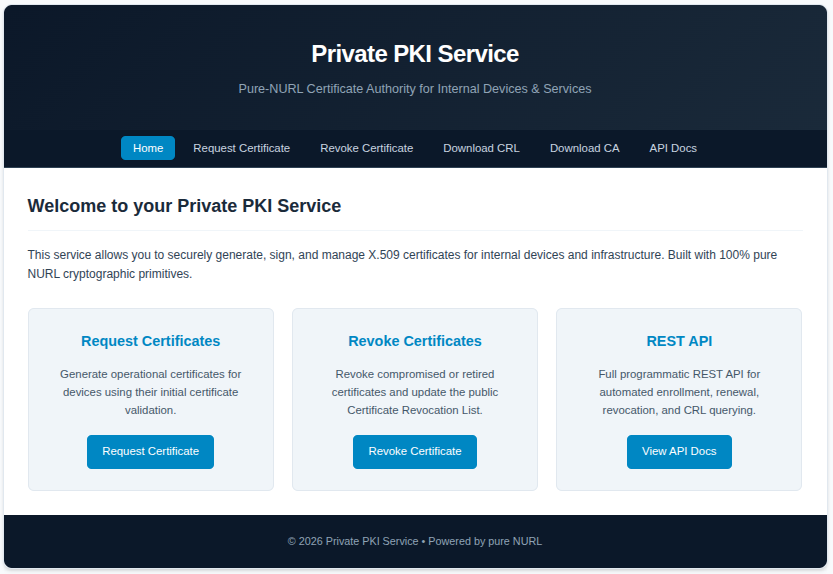
It is a complete, native implementation of a private CA: zero external dependencies, no shellouts to openssl binaries, native ASN.1 DER encoding, classical ECDSA P-256 or post-quantum ML-DSA (FIPS 204) signatures, automated CA initialization, device enrollment/renewal, operational certificate issuance, PKCS#10 CSR signing, RFC 5280 CRL generation, API key authentication, and a built-in server-rendered Web UI.
--algorithm p256 (default) or --algorithm mldsa44|mldsa65|mldsa87. The choice covers the CA key, every issued certificate and the CRL signature, so a PQ deployment has no classical signature anywhere in its trust path.POST /init): devices register with a shared initialization key (DEVICE_INIT_KEY).POST /renew_initial_cert): renew initial certificates before expiration.POST /request-cert): issue short- or long-lived operational certificates by presenting and cryptographically proving possession of the initial certificate.POST /request-csr): sign a PKCS#10 request the device generated locally, so its private key never crosses the wire. The subject key keeps whatever algorithm the requester chose (EC, RSA, Ed25519 or ML-DSA); the issuer signature always follows the CA.POST /revoke, GET /crl): revoke by serial number or certificate PEM, maintain an OpenSSL-style index.txt, and regenerate the RFC 5280 CRL. A revoked serial is enforced at issuance time, not merely recorded.MANAGEMENT_KEY on management endpoints and DEVICE_INIT_KEY on enrollment, both compared in constant time. Keys are auto-generated at startup when none is configured.basicConstraints and keyUsage (both critical), extendedKeyUsage, subjectAltName, subjectKeyIdentifier and authorityKeyIdentifier on every certificate.openssl verify -CAfile ca.crt cert.crt and openssl crl -in ca.crl -text. ML-DSA certificates are standard X.509 with the FIPS 204 OIDs (2.16.840.1.101.3.4.3.{17,18,19}) and need OpenSSL 3.5+ to be chain-verified by that tool.A classical CA is a store-now-decrypt-later liability of a particular kind: a recorded handshake is not the problem, a forged certificate is. Once a cryptographically relevant quantum computer exists, every P-256 CA key ever published can be recovered from its own certificate, and anything that still trusts that root can be impersonated for as long as the root is installed. Roots are long-lived by design, so the migration has to happen well before the machine does.
./pki-server --algorithm mldsa65 --ca-cn "Acme Internal Root"| Value | Parameter set | NIST level | Public key | Signature | Certificate |
|---|---|---|---|---|---|
p256 (default) | ECDSA P-256 / SHA-256 | — (classical) | 65 B | ~72 B | ~0.5 KB |
mldsa44 | ML-DSA-44 | 2 | 1312 B | 2420 B | ~4 KB |
mldsa65 | ML-DSA-65 | 3 | 1952 B | 3309 B | ~5.5 KB |
mldsa87 | ML-DSA-87 | 5 | 2592 B | 4627 B | ~7.5 KB |
Notes:
--algorithm decides what a new CA is minted with. An existing--ca-cert/--ca-key pair keeps its own algorithm, and the server reports the one actually in force via GET /health and on the startup banner. To change algorithms, mint a new CA in a new directory and re-enroll.
-----BEGIN PRIVATE KEY-----;P-256 keys as SEC1 -----BEGIN EC PRIVATE KEY-----. Both are written mode 0600.
classical and a PQ signature, per the LAMPS drafts) are not implemented. The choice here is pure-classical or pure-PQ.
the confidentiality of a recorded session additionally needs a PQ key exchange — NURL's TLS stack offers X25519MLKEM768 for that.
What this service does, and what it deliberately does not do:
std/subtle), so a request'sduration does not leak how many leading bytes of a key were correct.
your-device-init-key / your-management-key-here as working defaults; those strings now authenticate nothing. When no key is configured, a 192-bit key is generated at startup and printed to stderr once.
must be even-length hex (it is echoed into HTML, appended to a tab-separated index.txt and re-encoded as a DER INTEGER); a device ID and a certificate CN are reduced to [A-Za-z0-9._-] before naming a path.
submitted certificate names a directory, so a certificate is signature-checked against the CA before any of it is believed. The expiry window is deliberately not part of that check — revoking an expired certificate is legitimate.
Content-Security-Policy: default-src 'none'; script-src 'self'; …. The page's one script lives at /js/app.js so that policy can hold.
--ca-cert/--ca-key exist but do not load, or do not agree with each other, the server exits rather than minting a replacement — silently rotating a root invalidates every certificate ever issued under it.
index.txt, HSM /PKCS#11 key storage, OCSP, delta CRLs, an intermediate-CA hierarchy, or TLS termination. Run it behind a reverse proxy on a trusted network.
host as the trust boundary.
packages/pki-server/
├── nurl.toml               # Package metadata & dependencies (deps/http)
├── README.md               # Documentation & API specifications
├── docs/
│   └── pki-web.png         # Web UI screenshot
├── src/
│   ├── main.nu             # CLI entry point, argument parsing & server startup
│   ├── service.nu          # HTTP route controllers & request handlers
│   ├── pki.nu              # Core pure-NURL PKI engine (CA, X.509, CRL, ECDSA, ML-DSA)
│   ├── auth.nu             # API Key & device key authentication
│   └── ui.nu               # Server-rendered Web UI views & default styling
├── static/
│   └── css/
│       └── style.css       # Modern CSS stylesheet
└── tests/
    ├── smoke.nu            # In-process pure-NURL crypto & engine unit tests
└── pki_test.sh # End-to-end integration suite (classical + PQ passes)nurlpkg install pki-serverFrom the repository root:
./nurl.sh packages/pki-server/src/main.nu packages/pki-server/pki-server./pki-server --port 8080 --host 0.0.0.0| CLI Option | Environment Variable | Default | Description |
|---|---|---|---|
-p, --port | PORT | 8080 | TCP listen port |
-h, --host | HOST | 0.0.0.0 | Bind host address |
--algorithm | PKI_ALGORITHM | p256 | Signature algorithm for a new CA: p256, mldsa44, mldsa65, mldsa87 |
--ca-cert | CA_CERT | ./certs/ca.crt | Path to Root CA certificate |
--ca-key | CA_KEY | ./certs/ca.key | Path to Root CA private key |
--crl-file | CRL_FILE | ./certs/ca.crl | Path to generated CRL file |
--index-file | INDEX_FILE | ./certs/index.txt | Path to OpenSSL-style index.txt |
--initial-dir | INITIAL_CERTS_DIR | ./certs/initial | Directory storing initial enrollment certs |
--certs-dir | DEVICE_CERTS_DIR | ./certs/certificates | Directory storing operational certs |
--init-key | DEVICE_INIT_KEY | generated | Device enrollment shared secret |
--mgmt-key | MANAGEMENT_KEY | generated | Management API authentication key |
--ca-cn | PKI_FQDN | Private PKI CA | Root CA Common Name |
--serial-file | — | — | Accepted and ignored; serials are 96-bit CSPRNG values |
validity_days is capped at 3650 on every issuance endpoint.
GET /healthResponse (200 OK):
{
  "status": "healthy",
  "timestamp": "2026-08-19T20:00:00Z",
  "algorithm": "mldsa65",
  "post_quantum": true
}GET /ca-certResponse (200 OK):
{
  "ca_certificate": "-----BEGIN CERTIFICATE-----\n...\n-----END CERTIFICATE-----\n",
  "algorithm": "mldsa65"
}POST /init
Content-Type: application/json
{
"device_id": "sensor-node-01",
"key": "your-device-init-key"
}Response (200 OK):
{
  "certificate": "-----BEGIN CERTIFICATE-----\n...\n-----END CERTIFICATE-----\n",
  "private_key": "-----BEGIN EC PRIVATE KEY-----\n...\n-----END EC PRIVATE KEY-----\n",
  "serial": "3a8f12c9b4e10023f1a2b3c4"
}
device_id is restricted to [A-Za-z0-9._-]; anything else is a 400.
POST /renew_initial_cert
Content-Type: application/json

{
  "device_id": "sensor-node-01",
  "key": "your-device-init-key",
  "initial_cert": "-----BEGIN CERTIFICATE-----\n...\n-----END CERTIFICATE-----\n"
}
Response (200 OK): the renewed certificate and its private_key.
Supports both application/json and application/x-www-form-urlencoded.
POST /request-cert
Content-Type: application/json

{
  "device_id": "sensor-node-01",
  "initial_cert": "-----BEGIN CERTIFICATE-----\n...\n-----END CERTIFICATE-----\n",
  "validity_days": 90
}
Response (200 OK):
{
  "device_id": "sensor-node-01",
  "certificate": "-----BEGIN CERTIFICATE-----\n...\n-----END CERTIFICATE-----\n",
  "private_key": "-----BEGIN EC PRIVATE KEY-----\n...\n-----END EC PRIVATE KEY-----\n",
  "ca_certificate": "-----BEGIN CERTIFICATE-----\n...\n-----END CERTIFICATE-----\n",
  "serial": "3a8f12c9b4e10023f1a2b3c4",
  "algorithm": "p256",
  "expires": "2026-11-16T20:00:00Z"
}
Returns 403 when the device's enrollment certificate has been revoked.
The device generates its own private key locally and sends only the signed PKCS#10 request. The private key never leaves the client.
POST /request-csr
Content-Type: application/json
X-API-Key: your-management-key-here

{
  "csr": "-----BEGIN CERTIFICATE REQUEST-----\n...\n-----END CERTIFICATE REQUEST-----\n",
  "validity_days": 365
}
Response (200 OK):
{
  "status": "success",
  "certificate": "-----BEGIN CERTIFICATE-----\n...\n-----END CERTIFICATE-----\n",
  "ca_certificate": "-----BEGIN CERTIFICATE-----\n...\n-----END CERTIFICATE-----\n",
  "serial": "3a8f12c9b4e10023f1a2b3c4",
  "algorithm": "mldsa65",
  "expires": "2027-08-19T20:00:00Z"
}
The CSR's self-signature is verified before anything is issued; a tampered request is a 400.
Requires the management API key in X-API-Key, Authorization: Bearer <key>, ?api_key=, or an api_key form/JSON field.
POST /revoke
Content-Type: application/json
X-API-Key: your-management-key-here

{
  "certificate": "-----BEGIN CERTIFICATE-----\n...\n-----END CERTIFICATE-----\n"
}
Or revoke by hex serial number:
{
  "serial": "3a8f10b2c94d"
}
Response (200 OK):
{
  "status": "success",
  "message": "Certificate with serial 3a8f10b2c94d has been revoked",
  "serial": "3a8f10b2c94d",
  "revocation_time": "2026-08-19T20:00:00Z",
  "crl": "-----BEGIN X509 CRL-----\n...\n-----END X509 CRL-----\n"
}
Revoking by PEM requires a certificate this CA issued (400 otherwise) and also invalidates the named device's enrollment. Revoking by serial alone is enforced at the next issuance attempt via index.txt.
GET /crl?api_key=your-management-key-hereResponse (200 OK):
Content-Type: application/pkix-crl
Content-Disposition: attachment; filename=ca.crl

-----BEGIN X509 CRL-----
...
-----END X509 CRL-----Runs the whole engine against both a P-256 and an ML-DSA-65 CA, plus the input validators and the HTML escaper.
./nurl.sh packages/pki-server/tests/smoke.nu packages/pki-server/tests/smoke
./packages/pki-server/tests/smokeRuns the full lifecycle twice — classical and post-quantum — including the security regression tests (reflected XSS, index.txt injection, path traversal via a certificate SAN, serial-only revocation lockout, retired default credentials).
./packages/pki-server/tests/pki_test.sh