 NURL registrynurl-lang.org →
owner @Hindurable
[dependencies]
yoloe = "^0.8.2"
0.8.2 · 2026-10-22 · @Hindurable · files · api0.8.1 · 2026-10-16 · @Hindurable · files · api0.7.2 · 2026-10-10 · @Hindurable · files · api0.7.1 · 2026-10-08 · @Hindurable · files · api0.7.0 · 2026-10-03 · @Hindurable · files · api0.6.11 · 2026-09-13 · @Hindurable · files · api0.6.10 · 2026-08-31 · @Hindurable · files · api0.6.9 · 2026-08-26 · @Hindurable · files · api0.6.8 · 2026-08-26 · @Hindurable · files · api0.6.7 · 2026-08-16 · @Hindurable · files · api0.6.6 · 2026-07-26 · @Hindurable · files · api0.6.5 · 2026-07-20 · @Hindurable · files · api0.6.4 · 2026-07-17 · @Hindurable · files · api0.6.3 · 2026-07-07 · @Hindurable · files · api0.6.2 · 2026-07-07 · @Hindurable · files · api0.6.1 · 2026-07-07 · @Hindurable · files · api0.6.0 · 2026-07-06 · @Hindurable · files · api0.5.0 · 2026-07-05 · @Hindurable · files · api0.4.1 · 2026-07-01 · @Hindurable · files · api0.4.0 · 2026-06-30 · @Hindurable · files · api0.3.1 · 2026-06-30 · @Hindurable · files · api0.3.0 · 2026-06-30 · @Hindurable · files · api0.2.3 · 2026-06-30 · @Hindurable · files · api0.2.2 · 2026-06-30 · @Hindurable · files · api0.2.1 · 2026-06-30 · @Hindurable · files · api0.2.0 · 2026-06-30 · @Hindurable · files · api0.1.0 · 2026-06-30 · @Hindurable · files · apiA NURL port of YOLOE (THU-MIG, "Real-Time Seeing Anything", ICCV 2025). You name the classes you want — dog, bicycle, a person on a bike — and the model finds them, with no fixed label set. The detector runs on the GPU through packages/onnx (every layer a CUDA-C kernel compiled at runtime via NVRTC — no external inference engine), and promptability comes from YOLOE's region-text contrastive head.
Status: M6 done — instance segmentation, live from a webcam. The full YOLOE network runs on the GPU in pure NURL and matches onnxruntime (M2). The detector decodes, NMS-es, and draws boxes (M3). The prompt vocabulary is a runtime input (M4) and the MobileCLIP text path is pure NURL (M5, bit-exact). And now instance masks (M6): the segmentation mask-prototype branch (ConvTranspose2× upsample) runs on the GPU — the proto tensor matches onnxruntime to max abs err ~6e-5 — and the mask decode (coefficients · prototypes → threshold → crop → bilinear overlay) paints each object's silhouette. The frames can come straight off a webcam, captured in pure NURL via Video4Linux2 (open/ioctl/mmap, YUYV→RGB) — no ffmpeg, no OpenCV. Instance segmentation on the bus photo (input → masks), pure NURL on the GPU:Boxes only:
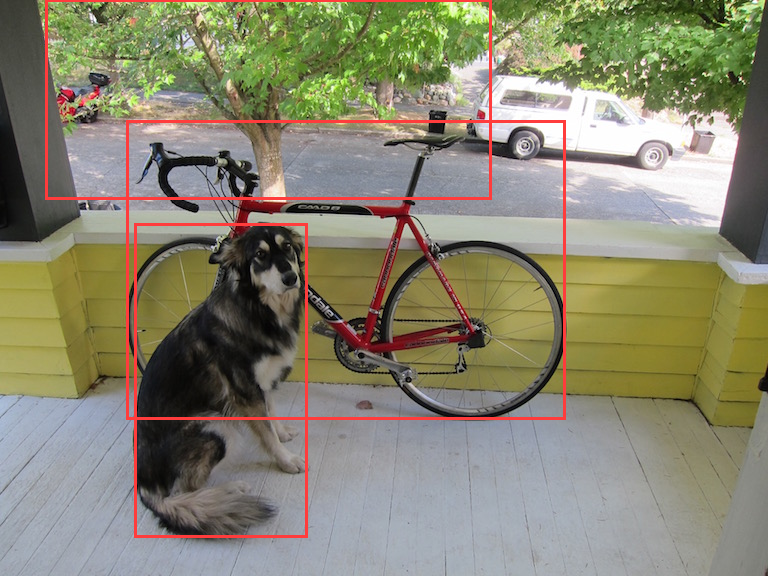
Same model, prompts supplied at runtime (
skateboard frisbee … tree wheel … dog bicycle):
nurlpkg install yoloe          # builds the `yoloe` command on your PATH
yoloe                          # prints the full help
The yoloe command has three flag-driven sub-commands:
yoloe detect --model M --classes C --image IMG [--out OUT]    boxes
yoloe seg    --model M --classes C --image IMG [--out OUT]    boxes + masks
yoloe cam --model M --classes C [options] live webcam| flag | meaning |
|---|---|
--model <model.onnx> | a YOLOE-seg export from tools/export.py (→ yoloe-v8s-seg.onnx); not bundled (~45 MB) |
--classes <classes.txt> | the vocabulary, one prompt word per line — swap it (and the model) to detect a different set of objects |
--image <img> | input for detect/seg — PNG, JPEG (baseline or progressive) or PPM, decoded natively via packages/image |
--out <path> | detect/seg: the annotated output image; cam: a directory to save frames to (created if missing) |
--device <dev> | cam webcam device (default /dev/video0) |
--frames <N> | cam: stop after N frames — omit to run until Ctrl-C |
--boxes | draw bounding boxes |
--mask | draw the segmentation masks (alias --segment) — neither flag ⇒ both; pick one for just that |
--window | cam: show in a real GUI window (X11) |
--terminal | cam: show in the terminal (truecolor half-blocks) |
--no-show | cam: don't display (e.g. when only --out-saving) |
--gpu <N> | CUDA device ordinal to run on (default 0) — pick the card on a multi-GPU box |
yoloe cam shows the segmented feed live. By default it opens a real GUI window (X11, full webcam resolution) when $DISPLAY is set, and otherwise draws into the terminal as true-colour half-blocks (two area-averaged pixels per character cell) — which also works over SSH, with no X11. Force either with --window / --terminal. With no --frames it streams until you quit (any key / the window's close button, or Ctrl-C in the terminal); add --out frames/ to also save each frame as a PPM. A half-block cell holds two independently-coloured pixels — the most a colour terminal can show — so the preview's resolution is the terminal's cell grid: a bigger window (or smaller font) gives a sharper picture.
yoloe seg --model yoloe-v8s-seg.onnx --classes classes.txt --image dog.jpg --out out.png
yoloe cam --model yoloe-v8s-seg.onnx --classes classes.txt              # live, in the terminal
yoloe cam --model yoloe-v8s-seg.onnx --classes classes.txt --frames 60 --out frames/
ffmpeg -framerate 10 -i frames/frame%05d.ppm seg.mp4                    # saved frames → video
example/classes.txt holds the default vocabulary from tools/export.py.
The exported YOLOE-seg model has two outputs: output0 [1, 4+nc+32, 8400] (boxes + class scores + 32 mask coefficients) and output1 [1, 32, 160, 160] (the mask prototypes). For each surviving detection the prototypes are combined by its coefficients, thresholded (sigmoid > 0.5), cropped to the box, bilinearly upsampled, and blended as a translucent colour — exactly ops.process_mask(..., upsample=True) in the reference. The proto branch (a ConvTranspose 2× upsample, added to packages/onnx) is verified element-wise against onnxruntime (tests/seg_fwd.nu: max abs err ~6e-5 over all 819 200 proto floats).
yoloe cam captures frames straight off a V4L2 webcam and draws them in the terminal — no ffmpeg, no OpenCV, no X11. src/v4l2.nu does open/ioctl/mmap on the kernel's video ABI, converts YUYV → RGB with the BT.601 integer transform, and uses memory-mapped streaming buffers; src/display.nu renders each segmented frame as 24-bit-colour half-blocks (▀, two pixels per cell), sized to the terminal via TIOCGWINSZ and homed each frame so the feed updates in place like a video. One GPU engine and one camera stream are reused across all frames. (Needs read access to the device — ls -l /dev/video0.)
src/prompt.nu (model from tools/export_promptable.py) takes the prompt text embeddings as a runtime input instead of baking the vocabulary in:
NURL_STDLIB=<repo> ../../nurl.sh src/prompt.nu
./src/prompt <model.onnx> <tpe.f32> <classes.txt> <img> [out]
tpe.f32 is K×512 raw MobileCLIP text features and classes.txt the K prompt words — both produced by tools/gen_tpe.nu / tools/gen_tpe.py. Swap them (no re-export) to detect different objects with the same model.
nurlpkg install                                   # symlink deps/
NURL_STDLIB=<repo> ../../nurl.sh src/main.nu      # build the `yoloe` command
./src/main seg yoloe-v8s-seg.onnx example/classes.txt dog.jpg dog-out.pngThe existing stack already runs real CNNs on the GPU from pure NURL: packages/gpu (CUDA driver + NVRTC), packages/onnx (an ONNX runtime), packages/objdet (tiny-yolov2, fixed 20 classes). YOLOE goes further on every axis:
fixed list. This is promptable detection.
(upsample + concat), and an anchor-free DFL detection head.
transformer; detection scores each region's visual embedding against the text embeddings.
                          ┌─ box head (cv2) ── DFL ──▶ xywh boxes
image ─▶ backbone+neck ─▶─┤
        (YOLOv8, GPU)     └─ embed head (cv3) ─▶ region embeddings ─┐
                                                                    ├─▶ class logits
prompt words ─▶ MobileCLIP text encoder ─▶ text embeddings ────────┘   (region · text)
The BNContrastiveHead is the key: class logits = BatchNorm(region_embed) · text_embed × exp(scale) + bias — a matmul between per-region visual embeddings and the prompt text embeddings. YOLOE's fuse() bakes the text embeddings into a 1×1 conv (zero inference overhead → a fixed-vocab YOLOv8); keeping the head un-fused makes the text embeddings a runtime input, which is how NURL gets runtime promptability.
Exported yoloe-v8s-seg with a 10-word prompt set and ran it through onnxruntime on the classic dog photo — genuine open-vocabulary detection:
prompts: person dog cat car bicycle truck backpack bottle chair bird
  dog        0.851
  bicycle    0.744
  truck      0.458
car 0.302images [1,3,640,640], output output0 [1,46,8400] =box[4] + cls[10 prompts] + mask[32] over 8400 anchors (3 scales: 80² + 40² + 20²). Boxes are decoded in-graph (DFL → xywh).
| op | count | status |
|---|---|---|
| Conv | 76 | ✅ in onnx |
| Sigmoid | 67 | M2 (elementwise; SiLU = Sigmoid·Mul) |
| Mul | 67 | ✅ tensor⊙tensor (eltwise bmode-2) |
| Concat | 20 | M2 (channel concat) |
| Split | 10 | M2 (channel split, multi-output) |
| Add | 8 | ✅ tensor+tensor |
| Reshape | 8 | M2 (shape-tensor; alias when contiguous) |
| MaxPool | 3 | ✅ (needs explicit pads for SPPF 5×5) |
| Resize | 2 | M2 (nearest 2× upsample) |
| Sub / Div | 2 / 1 | M2 (box decode, broadcast) |
| Softmax | 1 | M2 (axis — DFL over 16 bins) |
| Transpose | 1 | M2 (general permute) |
| ConvTranspose | 1 | seg-mask only (skip for detection) |
tools/).packages/onnx plus theexecutor upgrades they need (int64 shape/anchor tensors, multi-output nodes, Reshape/Constant), and verify the full 267-node forward pass numerically against output0. The core "dig onnx to diamond" work.
output0, threshold + NMS, map boxes backthrough the letterbox to image pixels, draw. Verify vs the reference.
embeddings are an input; in NURL do BatchNorm + matmul(text_emb). The prompt-embedding bank is generated by tools/ (MobileCLIP). The user passes class names at runtime.
prompt-words → embeddings needs no Python.
(vocab 49408, 8 heads, pre-norm) runs on the GPU and is bit-exact (max abs err 0) vs onnxruntime. Exported batch=1 by tools/export_text1.py (tokens[1,77] → feats[1,512]); kernels added to packages/onnx: LayerNormalization, Erf/GELU, Gather (device int64 indices), batched MatMul, N-D Transpose (perm6), and a specialised GatherND for the EOS readout. Verified by tests/text_fwd.nu.
src/bpe.nu is a pure-NURL port ofopen_clip's SimpleTokenizer (the tokenizer MobileCLIP wraps as get_tokenizer("ViT-B-16")) — byte-level BPE over the 49408-entry encoder + 48894 merges in assets/clip_merges.txt, with the CLIP word-splitting regex, <start_of_text>/<end_of_text> framing and pad-to-77. Its output is byte-identical to open_clip across the COCO-80 classes and tricky cases (multi-word, digits, punctuation, contractions, accents, CJK) — see tests/bpe_test.nu. tools/gen_tokens.nu turns a names.txt into the tokens.i64 the text encoder consumes; tools/tokenize_cli.nu prints ids for ad-hoc inspection.
tools/gen_tpe.nu does the whole prompt-words → tpe in one pure-NURL binary — tokenize (src/bpe.nu) then encode (the text-encoder ONNX via the runtime) — no Python. It matches PyTorch MobileCLIP to ~5e-6 across multiple prompts. tools/gen_tpe.py (Python MobileCLIP) remains as a cross-check.
ConvTranspose (2× upsample, weight [Cin,Cout,kh,kw]), added to packages/onnx as a CUDA-C kernel + the runtime now exposes a model's second output (rt_output1). output1 [1,32,160,160] matches onnxruntime to max abs err ~6e-5 over all 819 200 floats (tests/seg_fwd.nu).
src/mask.nu — coefficients · prototypes →threshold → crop → bilinear overlay (ops.process_mask equivalent), exposed as yoloe seg; detections + masks match the onnxruntime reference (tools/gen_seg_ref.py).
src/v4l2.nu captures frames from /dev/videoN inpure NURL (Video4Linux2 open/ioctl/mmap, YUYV→RGB, mmap streaming buffers — no ffmpeg/OpenCV) and src/display.nu draws the segmented feed live in the terminal (true-colour half-blocks via TIOCGWINSZ, no X11); yoloe cam ties it together (continuous until Ctrl-C, optional --out save), one GPU engine + camera stream reused across frames. detect / seg / cam are one flag-driven yoloe command (src/main.nu).
tools/)Needs a Python env with torch (CPU is fine), the YOLOE fork of ultralytics, mobileclip, onnx, onnxruntime, onnxslim, onnxscript (clone https://github.com/THU-MIG/yoloe and follow its install; MobileCLIP weights from Apple's mobileclip_blt.pt).
python tools/export.py   <workdir>                 # YOLOE → yoloe-v8s-seg.onnx
python tools/gen_ref.py   <workdir> <image.jpg>     # letterboxed input + output0 + detections
export.py chooses the prompt vocabulary (edit names); gen_ref.py letterboxes an image to 640×640, runs onnxruntime, and prints the reference detections used to verify the NURL implementation.
libcuda.so) + NVRTC (libnvrtc.so) — via onnx → gpu.libX11 for the GUI window (yoloe cam --window). The toolchain linksit only when the window code is used, but it must be present at build time (libX11.so.6, on every Linux desktop; apt install libx11-6). The terminal preview (--terminal) needs no X11 and works over SSH.
/dev/videoN for yoloe cam.tools/.